A live event can be perfectly planned and still fail for international viewers if the time is unclear. Someone in London may think the session starts in the evening, while someone in Jakarta sees it as early morning. A viewer in New York may save the date correctly but arrive one hour late because of daylight saving. This is why livestream time zones matter more than many creators and viewers expect.
Global livestreaming sounds simple because the internet feels borderless. The problem is that time is not borderless. A live session happens at one exact moment, but viewers experience that moment through their own country, clock, calendar app, and daily routine.
For Global Livestream Sound of Text, this topic belongs in the Timezones category because missing a live event is often not caused by bad internet or broken access. Sometimes, the viewer simply converted the time wrong.
Global Livestream Schedules Need More Than One Clock

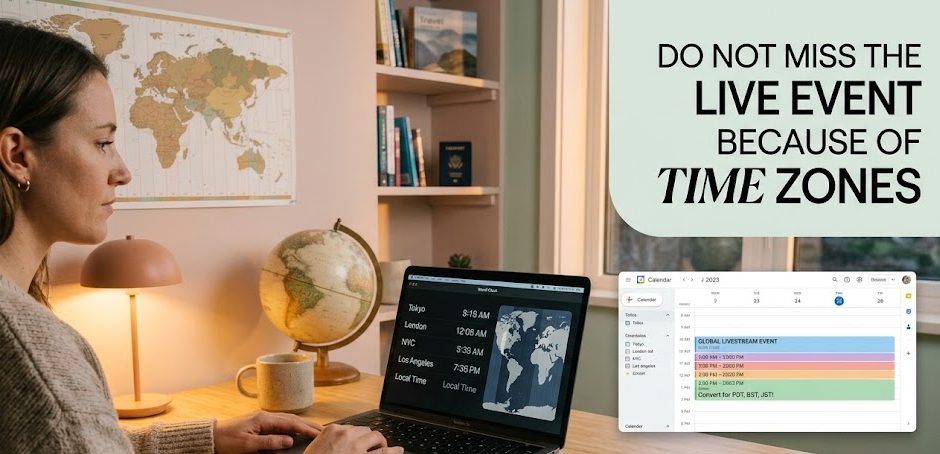
A global live schedule should never depend on one time label only. If an event says “8 PM tonight” without a time zone, international viewers are left guessing. Even when the event includes a time zone, some viewers may not know how to convert it.
What Does Livestream Time Zone Mean?
A livestream time zone tells viewers which local clock the event schedule is based on. For example, a live event may be scheduled at 8 PM EST, 7 PM GMT, 10 AM JST, or 3 PM UTC.
The time zone is important because “8 PM” does not mean the same thing everywhere. If a creator writes only “Live at 8 PM,” the schedule is incomplete for global viewers.
A better schedule includes:
- date
- start time
- time zone abbreviation or location
- converted time for major audience regions
- calendar link if possible
A clear schedule helps viewers know whether the event happens today, tomorrow, or in the middle of the night for them.
Why Do Viewers Still Miss Livestreams Even When The Time Is Listed?
Viewers often miss livestreams because the listed time is not written for their location. They may see the event time, assume it matches their local clock, and realize too late that the event already ended.
This happens often with:
- online concerts
- international webinars
- sports livestreams
- creator Q&A sessions
- gaming tournaments
- product launches
- global conferences
- virtual classes
The problem gets worse when the event crosses midnight. A stream scheduled for Friday night in one country may happen Saturday morning in another.
Why Is UTC Often Used For Global Livestreams?
UTC is often used because it gives one neutral reference point. Instead of choosing one country’s local time, an organizer can say the livestream starts at 18:00 UTC.
That helps avoid confusion when the audience is global. However, UTC is only useful if viewers know how to convert it to their own local time.
For casual audiences, UTC can still feel confusing. That is why many events combine UTC with examples:
“Live at 18:00 UTC, 1 PM New York, 6 PM London, 1 AM Singapore.”
That format is much easier for viewers.
Time Zone Confusion Gets Worse Around Daylight Saving
Daylight saving time can make global schedules feel even more confusing. Some countries change clocks. Some do not. Some regions change on different dates.
Why Does Daylight Saving Make Livestream Timing Harder?
Daylight saving changes the time difference between countries for part of the year. A viewer may be used to a creator going live at a certain local time, then suddenly the stream appears one hour earlier or later.
This matters for recurring livestreams. A weekly stream may still happen at the same local time for the creator, but international viewers may experience a shift.
For example, a creator may always go live at 8 PM in their own country. After daylight saving changes, viewers in another region may see that same stream move from morning to afternoon or from midnight to 1 AM.
Do All Countries Use Daylight Saving?
No. Some countries use daylight saving, some do not, and some have changed their rules over time. This is why creators should avoid assuming that all viewers understand seasonal clock changes.
For international audiences, it is safer to include a calendar link, a countdown page, or several converted time examples instead of relying only on one abbreviation.
How Can Viewers Avoid Daylight Saving Mistakes?
Viewers should avoid manual guessing when the event matters. Use a calendar app, world clock, or time zone converter. Search the exact event time with the time zone included.
For example:
- “8 PM EST to my time”
- “18:00 UTC to Jakarta”
- “7 PM London time to New York”
- “Tokyo 10 AM to Los Angeles”
A small conversion check can save the whole event.
The Best Global Schedule Is Written For Real People
A good livestream schedule should be readable by viewers who are tired, busy, or not familiar with time zone abbreviations. It should not feel like a puzzle.
What Should Creators Include In A Global Livestream Schedule?
A creator with international viewers should include more than one time format.
A strong schedule can include:
- Main event time with time zone.
- UTC time for global reference.
- Converted times for top audience regions.
- Calendar link.
- Reminder post before the event.
- Replay information if available.
Example:
“Live session starts Friday, 8 PM London time. That is 3 PM New York, 9 PM Berlin, and Saturday 3 AM Singapore. Replay will be available for registered viewers.”
This is much clearer than:
“Going live Friday at 8.”
Why Should Creators Mention The Day As Well As The Time?
Because global time zones can change the date. A livestream on Friday in one country may happen Saturday in another.
This is especially important for audiences in Asia, Australia, Europe, and the Americas watching the same event. If the event is late at night in one region, it may already be the next day somewhere else.
A schedule should not only say “8 PM.” It should say “Friday, 8 PM GMT” or “Saturday, 10 AM JST,” depending on the source time.
What Is The Most Viewer-Friendly Way To Announce A Live Event?
The most viewer-friendly method is to use a clear announcement plus a calendar option.
A good announcement looks like this:
“Join us live on Thursday, March 12 at 18:00 UTC. Local examples: 1 PM New York, 6 PM London, 7 PM Paris, and 2 AM Singapore on Friday. Add it to your calendar so it converts automatically.”
This style helps both casual viewers and global viewers.
Viewers Need Their Own Time Zone Habit Too
Creators should make schedules clear, but viewers also need better habits when following international live events. A global audience cannot rely on memory alone.
How Can Viewers Convert A Livestream Time Correctly?
The easiest way is to use a digital calendar or time zone converter. Copy the event time, include the time zone, and convert it to your city.
If the event page has an “Add to Calendar” button, use it. Calendar apps usually convert the event to local time automatically.
Before the stream starts, check:
- local date
- local start time
- original time zone
- reminder setting
- platform link
- replay rule
This is especially useful for ticketed events, work webinars, online classes, and global fan events.
Why Do Calendar Apps Sometimes Show A Different Time?
Calendar apps may show a different time because they convert the event into the viewer’s local time zone. This is usually helpful, but it can confuse viewers who compare the calendar time with the original event announcement.
The best habit is to trust the calendar only after checking that the original time zone was entered correctly.
If someone manually creates a calendar event without selecting the right time zone, the reminder may be wrong.
Should Viewers Set More Than One Reminder?
For important livestreams, yes. One reminder may not be enough, especially if the event happens at an unusual hour.
A good reminder setup can be:
- 24 hours before
- 1 hour before
- 10 minutes before
This gives viewers time to check the link, device, ticket, login, and internet connection.
Time Zones Affect Audience Energy, Not Only Attendance
Time zone planning is not only about whether viewers can show up. It also affects how awake, responsive, and engaged they are.
Why Does A Good Time For One Country Feel Bad For Another?
A live time that feels perfect for the creator may be inconvenient for many viewers. A 7 PM stream in one country may be 3 AM somewhere else.
This matters for interactive formats such as:
- Q&A
- live shopping
- webinars
- community chats
- language practice
- creator hangouts
- training sessions
If many viewers are sleepy, working, or commuting, the live chat may feel quiet even when the audience likes the content.
How Can Creators Serve Multiple Time Zones?
Creators with global audiences can rotate live times, provide replays, or create two sessions for different regions. They can also ask viewers which time works best.
Useful options include:
- rotating weekly live time
- morning session for Asia and evening session for Europe
- replay for missed viewers
- highlight clips after the live
- poll for preferred time zone
- schedule based on analytics
This shows viewers that the creator understands the audience is not living under one clock.
The Cleanest Way To Think About Livestream Time Zones
Livestream time zones are not just technical details. They decide whether viewers arrive early, late, or not at all. They also affect viewer energy, chat activity, attendance proof, replay demand, and overall event satisfaction.
A good global schedule should name the time zone, show converted examples, mention the date clearly, and make the event easy to save. Viewers should use calendars, reminders, and time zone converters instead of guessing.
The live moment may happen once, but the audience is spread across many clocks. A strong livestream schedule respects that reality.


Amara Nwosu is a digital culture writer who has covered online media communities in Africa, Europe, and parts of Asia. She previously worked on international communications projects involving live conferences, cultural broadcasts, and multilingual digital campaigns. Her articles examine how internet access, local platforms, language, and cultural habits shape the way people create and watch livestreams around the world.